FLUX.2 Pro AI Image Generator - Production Quality

FLUX.2 Pro is the production-ready FLUX AI image generator. Create polished product photos, marketing assets, and high-fidelity edits with FLUX.2 Pro — the top choice for commercial AI image generation.

0/2000

Preview

Result will appear here

Production-ready FLUX images

Why create with FLUX.2 Pro?

FLUX.2 Pro balances visual fidelity, prompt adherence, and production cost. Use FLUX.2 Pro when a draft needs to become a polished product image, campaign asset, or controlled edit with convincing materials and lighting. FLUX.2 Pro is the go-to FLUX AI image generator for professional commercial work.

Text to ImageImage Edit · up to 3 references
FLUX.2 Pro production visuals
FLUX.2 Pro product photography
High-fidelity FLUX image editing

Standard

Up to 1024px on the longest edge

Text 2 credits · Edit 3 credits

High

Up to 1280px on the longest edge

Text 3 credits · Edit 4 credits

Ultra

Up to 1536px on the longest edge

Text 4 credits · Edit 5 credits

Real model outputs

See FLUX.2 Pro generate and edit

Both examples were generated through the exact WaveSpeed model used by the tool above and are served from this site.

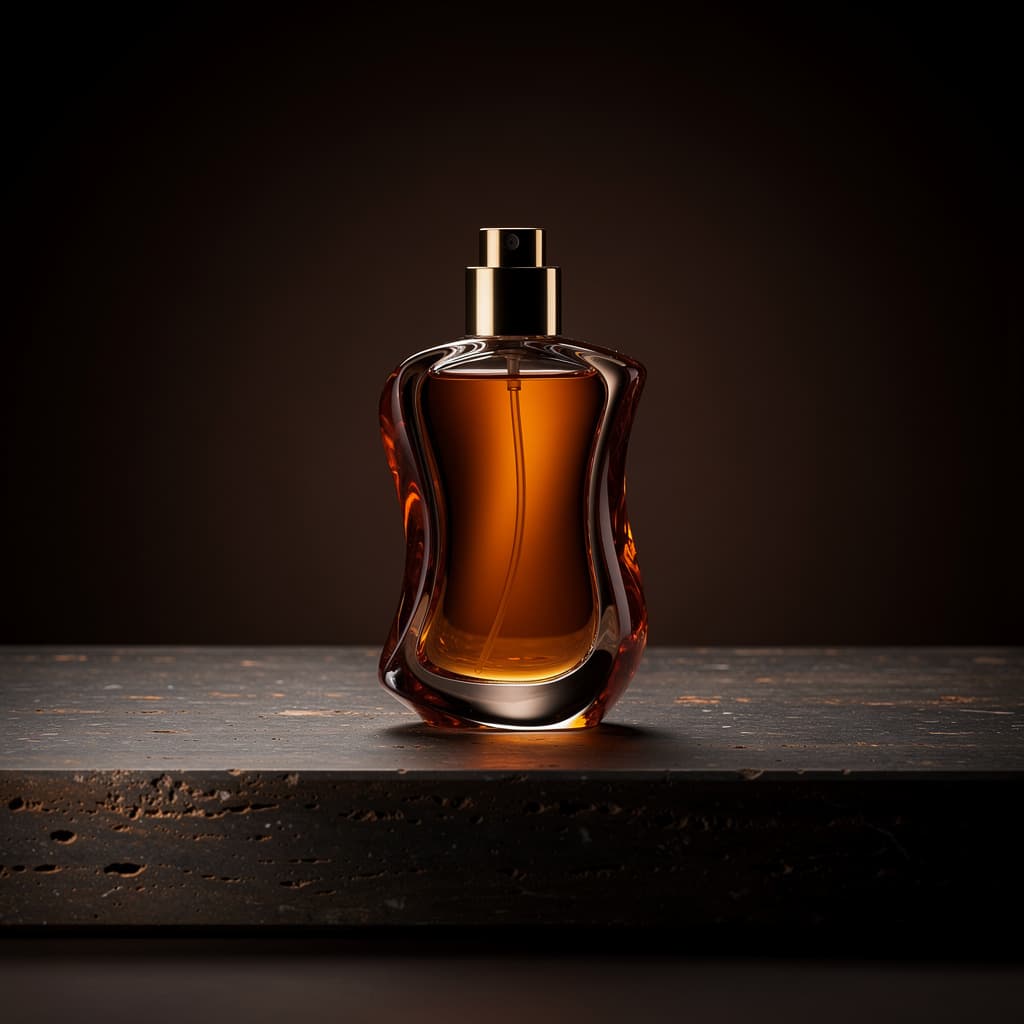
Amber perfume product photograph generated with FLUX.2 Pro AI image generator

Text to Image

FLUX.2 Pro produced this production-oriented product visual with controlled reflections, glass, and dark studio lighting.

Prompt

Premium studio product photograph of a sculptural amber perfume bottle on dark travertine, controlled rim lighting, realistic glass refraction, restrained luxury campaign styling, crisp commercial detail

Perfume product background changed with FLUX.2 Pro image edit

Image Edit

FLUX.2 Pro keeps the product recognizable while the entire campaign environment changes.

Prompt

Keep the perfume bottle unchanged and replace the dark studio with a warm ivory stone set, soft morning sunlight, and delicate botanical shadows; premium commercial photography

01

Build polished commercial visuals with FLUX.2 Pro

Generate product shots and campaign assets with FLUX.2 Pro for stronger material, lighting, and surface detail. FLUX.2 Pro delivers production-quality AI image generation.

02

Refine without rebuilding using FLUX.2 Pro

FLUX.2 Pro preserves the product or subject while replacing backgrounds, lighting direction, and art direction. FLUX.2 Pro image editing maintains brand consistency.

03

Balance quality and credits with FLUX.2 Pro

Move beyond drafts with FLUX.2 Pro without immediately choosing the highest-cost model in the lineup. FLUX.2 Pro offers the best quality-to-cost ratio for production work.

How it works

Create with FLUX.2 Pro in three steps

1

Set the FLUX.2 Pro production goal

Choose Text to Image for a new asset or FLUX.2 Pro Image Edit when an existing subject must be preserved.

2

Specify materials and lighting for FLUX.2 Pro

Describe surfaces, lens style, light direction, background, and the elements that cannot change. FLUX.2 Pro follows detailed material and lighting instructions.

3

Review FLUX.2 Pro at the right quality

Draft at Standard or High, then use FLUX.2 Pro Ultra for a larger final candidate.

Compare models

Explore the complete FLUX.2 lineup

View model hub →

About FLUX.2 Pro

FLUX.2 Pro is aimed at more polished production work, while FLUX.2 Klein prioritizes faster and lower-credit iteration. FLUX.2 Pro delivers higher fidelity for commercial use.

Yes. Clear preservation instructions and strong reference images help FLUX.2 Pro retain the subject while changing its setting or lighting. FLUX.2 Pro excels at product-preserving edits.

FLUX.2 Pro Text to Image costs 2, 3, or 4 credits by quality. FLUX.2 Pro Image Edit costs 3, 4, or 5 credits.

Yes. FLUX.2 Pro Image Edit accepts up to three reference images in this workspace. Multiple references help FLUX.2 Pro understand context better.

Upload your product image as a reference, switch to FLUX.2 Pro Image Edit mode, and describe the background and lighting you want. State clearly which details (logo, shape, colors) must stay unchanged so FLUX.2 Pro preserves them while replacing the setting.

FLUX.2 Pro balances quality and credit cost for most commercial work. Choose FLUX.2 Max only for hero campaign images where maximum fidelity in skin, fabric, and atmosphere justifies the higher credit cost.

Yes. Switch to FLUX.2 Pro Image Edit mode, upload up to three reference images, and describe what should change. FLUX.2 Pro preserves subjects well while replacing backgrounds, lighting, color, and art direction.

FLUX.2 Pro is best for polished production visuals: product photography, marketing assets, campaign imagery, and controlled edits where materials, lighting, and surface detail need to look professional. FLUX.2 Pro is the production standard in the FLUX.2 lineup.

Create your next image with FLUX.2 Pro

Start from a prompt or upload references, choose the output quality, and generate directly on this page.